

containerTag gets it’s own profile.
Note: It’s called “user” profile, but in reality it can be anything - an agent, organization, etc.
Instant Context
No search needed — comprehensive user info always ready
Auto-Updated
Profiles update as users interact with your system
Why Profiles?
Traditional memory systems rely entirely on search:
Search is too narrow: When you search for “project updates”, you miss that the user prefers bullet points, works in PST, and uses specific terminology.
Profiles provide the foundation: Instead of searching for basic context, profiles give your LLM a complete picture of who the user is.
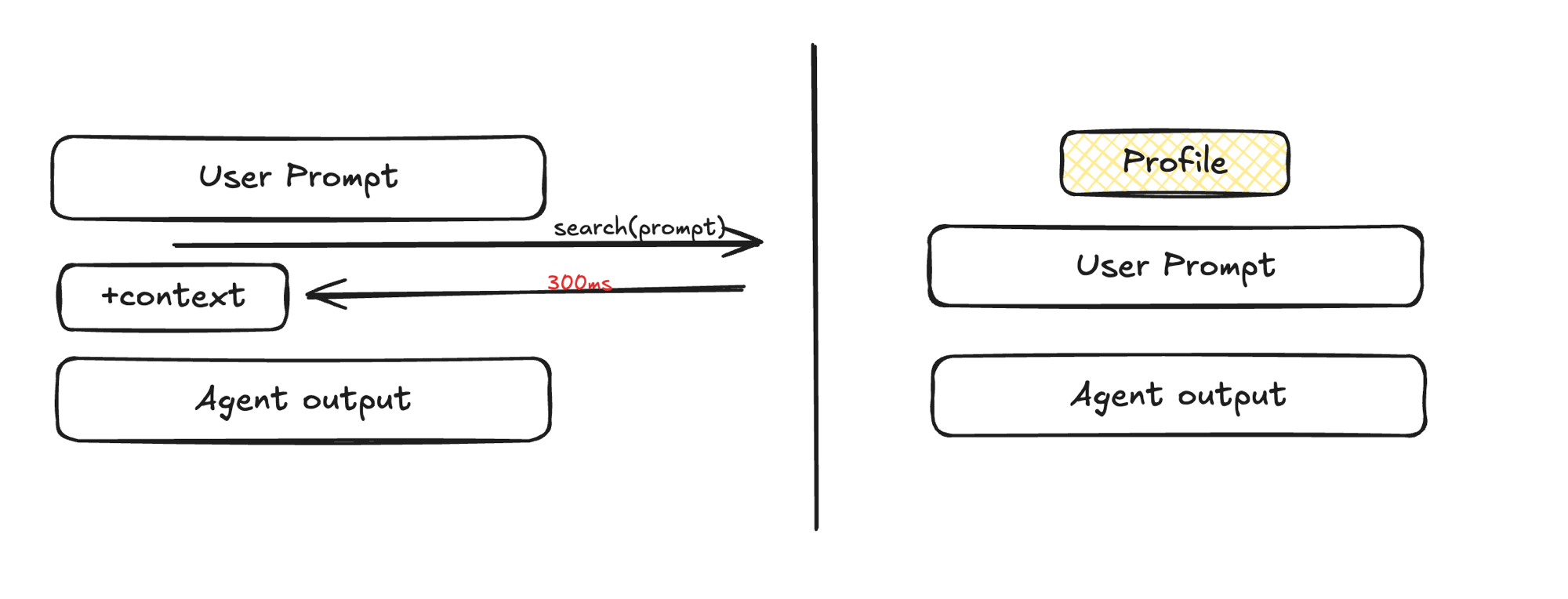
search(prompt) round trip before the agent can respond. A profile is attached once and sits alongside every user prompt and agent output — no extra call, no latency, and no risk of the query missing something important.
Non-literal-matching use cases
Semantic search retrieves content that’s similar to the query — it’s built for questions like “what did we discuss about the migration?” It’s a poor fit for facts that should be known regardless of what’s being asked, because there’s rarely a query that’s semantically close to them. The clearest example is the user’s own name. If someone tells your agent “call me Dhravya, not my full name” once during onboarding, that fact has almost nothing in common — vector-wise — with “help me plan a trip to Japan” or “review this PR.” A search for either of those queries will not surface the name preference, because search only returns what’s relevant to the query, and a name preference isn’t relevant to trip planning or code review — it should just always be there.Static vs Dynamic
Profiles separate two types of information:Static Profile
Long-term, stable facts:- “Sarah is a senior software engineer at TechCorp”
- “Sarah specializes in distributed systems”
- “Sarah prefers technical docs over video tutorials”
Dynamic Profile
Recent context and temporary states:- “Sarah is migrating the payment service to microservices”
- “Sarah is preparing for a conference talk next month”
- “Sarah is debugging a memory leak in auth service”
Buckets
Static and dynamic split facts by how long-lived they are. Buckets split them by topic — a third, independent axis you define, likepreferences, goals, or work. As content is ingested, a classifier sorts each fact into the buckets it matches.
Every org starts with a default preferences bucket. Add your own in console settings at the organization level, or per space — space buckets are add-only, so a container tag always keeps every org-level bucket.
filterPrompt, which controls what gets ingested at all — buckets only organize facts that already made it into the profile.
Profile Buckets reference
Request bucketed profiles, create buckets at the org or space level, get AI-generated suggestions, and see validation limits.
How It Works
Profiles are built automatically through ingestion:- Ingest content — Users add documents, chat, or any content
- Extract facts — AI analyzes content for facts about the user
- Update profile — System adds, updates, or removes facts
- Always current — Profiles reflect the latest information
You don’t manually manage profiles — they build themselves as users interact. Start by adding content to see profiles in action.
Profiles + Search
Profiles don’t replace search — they complement it:- Profile = broad foundation (who the user is, preferences, background)
- Search = specific details (exact memories matching a query)
Example
User asks: “Can you help me debug this?” Without profiles: LLM has no context about expertise, projects, or preferences. With profiles: LLM knows:- Senior engineer (adjust technical level)
- Working on payment service (likely context)
- Prefers CLI tools (tool suggestions)
- Recent memory leak issues (possible connection)
Filtering Profiles
Not many people realize this, but profiles support the same metadata filtering as memory and document search. A profile is synthesized from the underlying memories in a container tag, so anyAND/OR metadata filter you’d pass to search also narrows which memories are eligible to contribute to static, dynamic, and buckets.
q and filters to scope both the profile synthesis and the accompanying search results in one call. See Filtering Profiles for the full parameter reference.
Use Cases
Personalized AI Assistants
Profiles provide: expertise level, communication preferences, tools used, current projects.Customer Support
Profiles provide: product usage, previous issues, tech proficiency.- No more “let me look up your account”
- Agents immediately understand context
- AI support references past interactions naturally
Educational Platforms
Profiles provide: learning style, completed courses, strengths/weaknesses.Development Tools
Profiles provide: preferred languages, coding style, current project context.Next Steps
User Profiles API
Fetch and use profiles via the API
Profile Buckets
Create and configure topical buckets
Graph Memory
How the underlying knowledge graph works
AI SDK Integration
Automatic profile injection with AI SDK
Add Memories
Build profiles by adding content